My experience running IT infrastructure at home, with some recommendations for
anyone starting out on their Homelab journey.
I’ve been running a home server of some kind for more than 20 years. It started when I was at university, hosting a website on an old PC to share party photos (this was in the days before social media). It worked, but was madness in hindsight. The intent wasn’t to make the photos public (it was password-protected), but I was publishing PHP applications (Drupal and Gallery) on the public internet with a “make it work” Apache configuration, whilst being blissfully ignorant of the security risks. That code running today would be compromised in seconds.
Since I left university, all my home servers have been lan-facing only – no external ports. My approach has always been fairly minimalist, mainly because I’ve moved around a lot and never had the spare space to keep lots of IT hardware. I went from flatting in Christchurch, to flatting in Auckland, to living in London where space is at a premium. It’s only in the past year that we’ve brought a house and I’ve been able to consider a more expansive setup. However playing with enterprise hardware doesn’t excite me the way it used to, so I lean heavily towards the quiet and energy efficient, which for the most part means lower-power enthusiast-grade gear.
Of course those that know me would scoff at calling my setup minimalist, because by the standards of normal people it’s anything but. I have 3 rack-mounted switches (all connected with 10Gb uplinks), 3 PCs cosplaying as servers, a router and an ex-enterprise wireless access point all sitting on the “coms shelf”. Most people just have the WiFi router their ISP supplied, plus a couple of laptops, phones and maybe a desktop in the office.
It wasn’t always this way though, my home network has evolved over the years, and will no doubt continue to do so. So consider this a snapshot in time of my personal learning.
Past solutions
Feel free to skip to newly rennovated if you just want a description of the current setup, or what would I change for my actual learnings.
2000’s – Student Days
My student days were before WiFi was widespread. 802.11b was the WiFi standard of the time, and it delivered a paltry 11mb, so most of us would run ethernet cables from our bedroom to the DSL router which was typically situated next to the phone jack in the living room. 100mb is slow by modern standards, but it was plenty fast back then.
The “flat server” would be an old desktop PC (usually the hardware from my previous build – I upgraded regularly in those days), with a bunch of hard drives for sharing files. I didn’t bother with raid, backups were on CD-Rs, and only contained important documents. If a hard drive died I’d just re-download a bunch of stuff the next time I went to a LAN party. Any important documents (and some Linux ISOs) were backed up to CD-Rs.
It was also used as a music PC for parties and a general use “lounge PC”. It ran Windows 2003, but really it was less of a server, and more of a living room PC that happened to share files.
2010 – Early Home Server
In 2010 I wrote a series of articles on building a home server with Ubuntu 10.04. That setup had some flaws, but those articles became the most popular on this blog for quite some time, so people clearly found it useful.
The goal was an all-in-one home server, performing NAS and media centre duties, and was reflective of how I approached home IT at that time. Having an always-on PC connected to the TV is convenient, because it has to be on anyway to serve files, so you might as well use it for media duties as well! TV cabinets are also one of the few spaces in many homes for this kind of equipment.
These days though, there are far more practical devices available to plug in to a TV, and I see little need for a “home theatre” PC. Apple TV, Nvidia Shield and dare I say it, Android TV devices are all very affordable, and far more reliable and convenient.
2011-2015 – Early London flats

When I moved to London I downsized. All my PC hardware was left behind, and I took just a laptop and external hard drive with me. For a while I went without a home server of any kind. When I started to get settled, I consciously went with an “appliance” approach; I.E. smaller specialised devices.
I bought a dedicated NAS appliance (Netgear ReadyNAS Duo NV2+) to store files, and a Boxee Box (remember those?) for HTPC duties. My laptop remained my primary client.
The Netgear NAS was convenient for a while, and fairly cheap, but in the end it turned out to be a misstep. It lacked the horsepower to run anything beyond basic file sharing services, and even then it was very slow, not even coming close to being able to saturate the 1GB uplink. Real NAS devices with decent hardware were just too expensive, but I couldn’t even run backup software on the ReadyNAS with acceptable performance.
The one good decision I made during this period was purchasing an Asus RT-AC68U router, which lasted through six (!) flat moves (by contrast, the Boxee Box lasted just one, and the ReadyNAS two). Using my own router was great for continuity, reducing the setup after each move, and it was appreciably more performant than the ISP-supplied hardware of the time.
2015-2020 – Later London Years
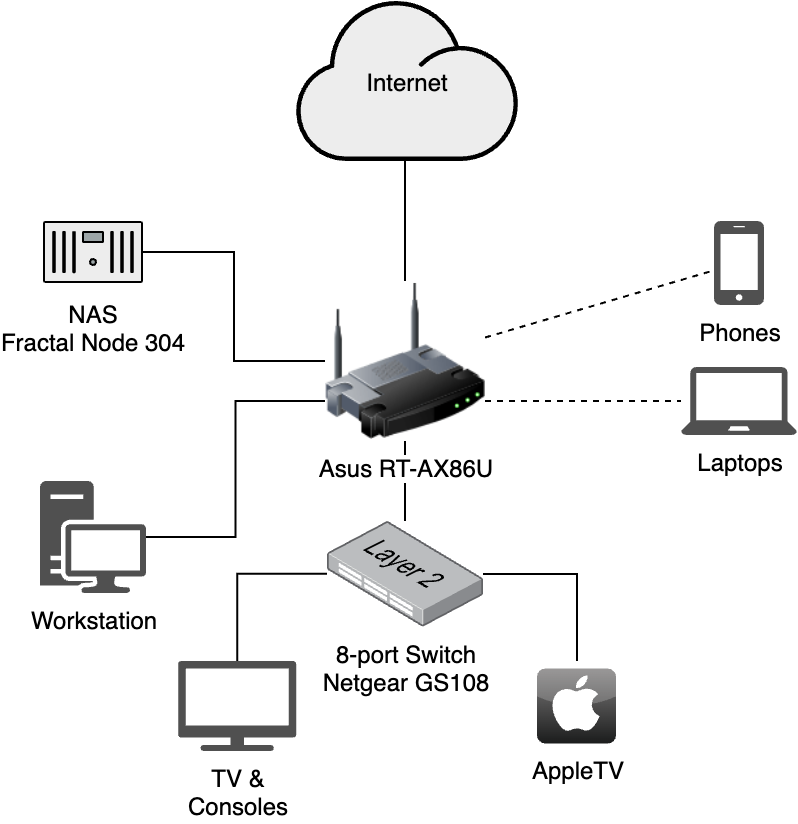
By this stage I also ran a desktop PC for gaming, photo & video editing, and a bit of work as well, so demands were increasing.
It was the limitations of the Netgear NAS that led me to building a decent dedicated NAS for the first time. Those articles are the last time that I have written about server setups in detail.
Frankly, writing setup guides like the above is time-consuming, and it’s difficult to write it as you build your own setup. Other people have also done a much better job, and you really need spare hardware to build and test your documentation on, unless of course you use your “production” hardware, but if you can do that then did you really need a NAS in the first place?
A Tangent on Networking
One thing that’s challenging in rented accommodation is the network. In London I used the Merlin firmware with my Asus routers, which provided a good balance of performance and customisability. Asus supports the base firmware well, and the Merlin firmware added a few niceties such as ssh access and newer versions of certain packages (OpenVPN, Wireguard in particular).
The RT-AC68U was the first of those, and I used it for about 8 years – an incredible run. I eventually replaced it with an RT-AX86U, and the performance improvement was immediately apparent (which could be taken as a sign that I should have replaced it sooner), but I don’t think I’ve ever had better value for money from a piece of networking equipment than that AC68U.
Clients were almost exclusively wireless, but I’d wire my desktop in when I could. However in one particularly long and narrow flat, where we happened to be working from home during the covid lock-downs, I resorted to running an ethernet cable from one end of the house to the other, because the WiFi performance was abysmal.
But there’s only so much you can do to a house that’s not yours, so I’d really gone about as far as I could practically go in a London flat with my all-in-one WiFi router, a NAS, and a desktop PC. Since covid in particularly I’ve been itching to build a decent network, and I finally got the opportunity late last year.
2025 – Newly Renovated
Now that we own our home I have a lot more control, and no longer need to seek permission to put a nail in wall. Actually I do, but that person also sleeps next to me, so it’s a bit easier.
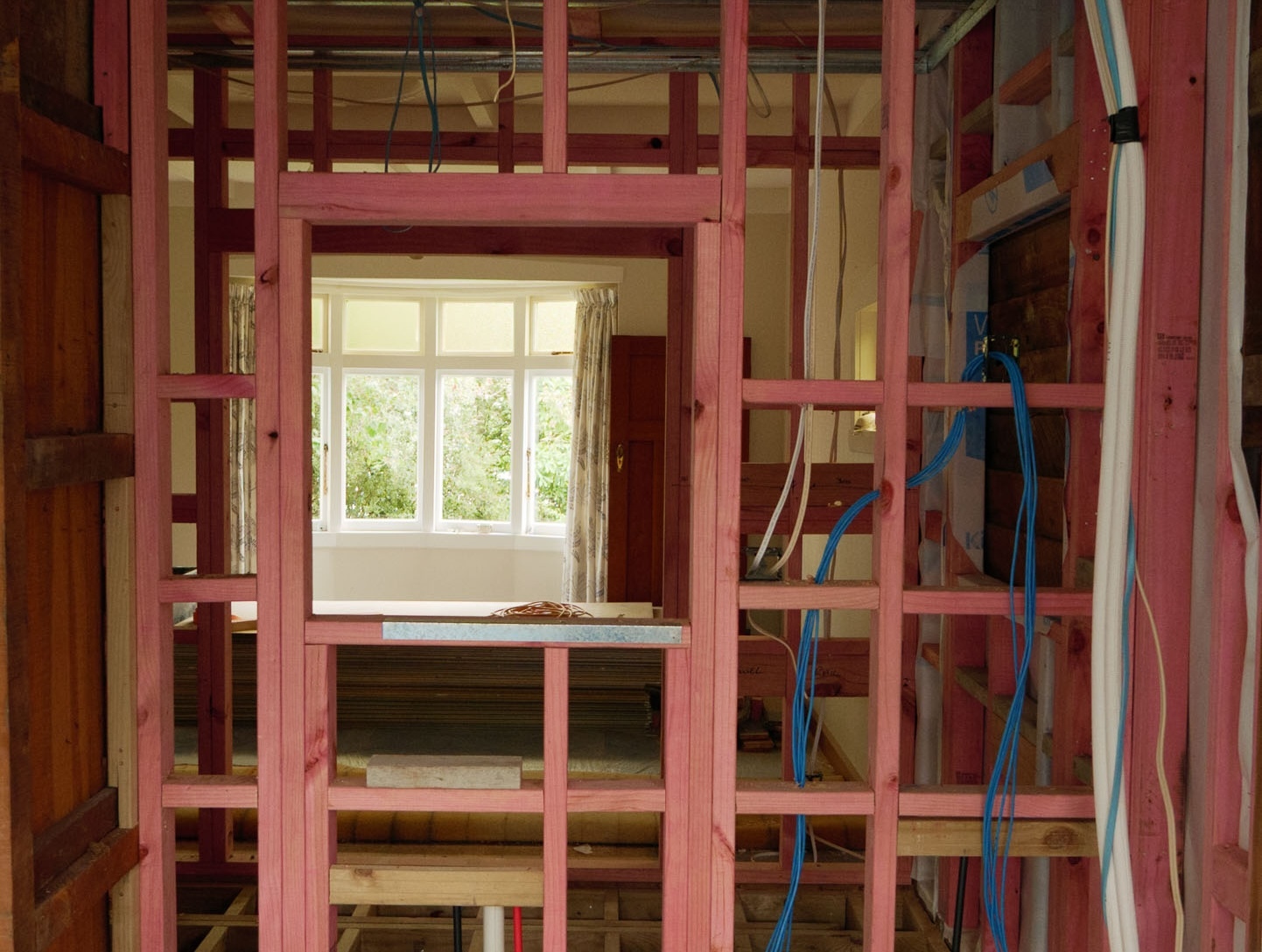
Before we moved in we did some fairly substantial renovations, which included having most of the walls off – a perfect opportunity to install cat 6 wiring. We also removed a fireplace in the dining area, which left an open space to install a desk, and a shelf above it for network hardware.
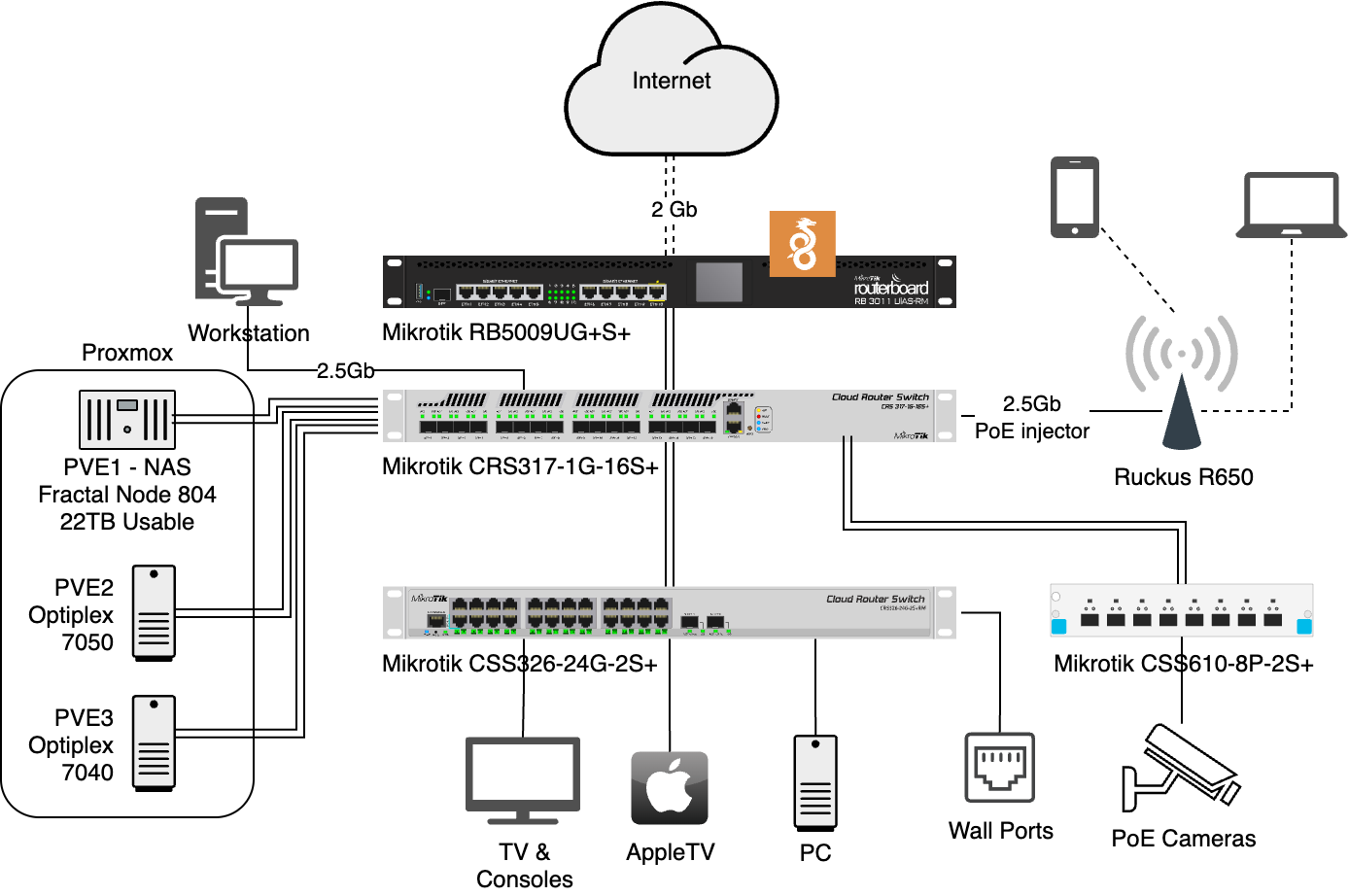
I’ve steadily built it out over the past year, and it currently looks like this:
It’s probably overkill.
Do I need 10Gb to my NAS?
Well let’s see. I don’t have a single 10Gb client. Most of the time I’m connected over Wifi6. The main array is a mirrored pair of 18Tb Seagate Exos drives that can barely saturate 1Gb. So no, I don’t need 10GbE at all. About all it does is ensure is that migration of VMs between Proxmox hosts is snappy, and that the wired LAN will never be a bottleneck.
If you look closely, you might even notice that only the Proxmox nodes and the workstation are capable of saturating the internet connection.
What would I change?
A few things.
Change 1 – Fibre in the walls
I put cat6 in because the contractors we had on site could do it, and it supports up to 10GbE, which is plenty right? Well yes, but there’s a catch.
10Gb over copper twisted-pair wiring today is power-hungry. The network cards run hot, and the SFP modules will sear your fingers. They consume about 3W at each end, which doesn’t sound like much, but spread across an area the size of your thumbnail it results in very high temperatures – the modules routinely hit 70+ degrees.
Thus, 10Gb over cat6 is really a last resort until we get much more efficient hardware. For the cabinet you should use DAC (direct-attach cables), and for longer runs across the same site multi-mode fibre is the way to go. Both are much more power efficient – under 1W at each end.
Fibre is harder to terminate though – it requires expensive equipment and the skills aren’t as common, so it costs more. However despite the costs I now wish I’d run a fibre connection to the office, and also to the TV where I put six cat6 runs (I’m using 3 of them today, and in future I plan to do a remote gaming PC, so there was method to the madness).
Change 2 – A single switch
This is more wishful thinking, but I’d love to be able to consolidate the 3 switches into a single device. It would need to have at minimum:
- 4 SFP+ ports
- ~24 RJ45 ports, of which at least:
- 8 should be 2.5Gb
- 8 should be PoE
- 1 should be both 2.5Gb and PoE
- Be totally silent
- Cost in the range of $2,000 NZ (~£1,000)
As far as I’m aware such a device does not exist, and even if it did it would have little room for expansion, so in practice more SFP+ ports would be needed. It would also be nearly impossible for it to be silent if devices with comparable bandwidth are anything to go by.
In reality, splitting the PoE, endpoint and core switch roles between 3 devices is the most cost effective solution, and probably the quietest (if not the most power efficient, but I don’t think it lags on that one by a lot).
Having to use a PoE injector and a 2.5G base-T SFP+ module to get a 2.5Gb PoE port for the WiFi access point is quite annoying, so a 2.5Gb PoE switch would be great to have. But cameras only need 100mb, so a whole switch of 2.5Gb PoE ports for sake of a single WiFi AP (or even two) would be quite a waste. So it’s yet another an extra device to clutter the cabinet, but also a pragmatic choice.
Network Recommendations
- Used enterprise gear is unbeatable value… if you can bear the noise and power consumption, or you have a garage or basement to keep it out of living areas, AND you have the technical skill to operate it. But for most people, Ubiquiti and Mikrotik are the way to go. Ubiquiti if you want ease of use and features, Mikrotik if you want features and value.
- Use at least 3 devices. Keep your router, wifi access point, and core switch separate. Add another switch if you need PoE. This way you get more capable devices, and can upgrade them independently.
- 2.5GbE is the sweet spot for desktops and HDD-based NAS devices. Unless you have a huge ZFS array or use SSDs, a 10Gb connection to your NAS doesn’t bring much benefit, but it’s not worth tolerating 1GbE any more either.
- 10Gb trunk connections (between switches) are currently the sweet spot and highly affordable, so only buy switches and routers with at least one (preferably two) 10GB SFP+ ports for uplinks.
- Use fibre and direct attach cables (DAC) for 10GbE, and only between switches and servers.
- For copper wiring stick to 2.5Gb – the power consumption of 10G over cat6 cabling isn’t worthwhile today, although it may get better in future. 5Gb apparently doesn’t save much power over 10Gb – may as well skip it and go straight to 10.
- Consider putting some muti-mode fibre in the walls when doing cat6 drops – it’ll give you more options for high speed ethernet later down the line.
Thoughts on Proxmox
In the above diagram you may have noticed the Proxmox cluster. This is a standard feature in homelab setups, and I have some thoughts.
For the longest time I’ve run a single server with everything (except software distributed as Docker containers) installed on the metal. This worked well for me because it provided services to the LAN only, so security isolation wasn’t necessary, and Debian/Ubuntu is a supported target for any software I could care to run.
And honestly, for me as a sysadmin, it was just easier; the overhead of a virtualisation or a container layer didn’t seem worthwhile. That may still be the case for you, and if you only need to run a few services on a single server I think it’s perfectly sensible. But if the primary role is file sharing I would recommend running TrueNAS for ease of administration, as it also supports containers and will probably be able to run whatever sundry services you need. Especially if you’re not a professional sysadmin.
A few things pushed me towards virtualisation this time around (and by extension Proxmox as it’s the defacto standard these days):
- The number of services I want to run has grown, and some of them (Home Assistant) assume they have full control over the OS in their deployment. So I was faced with either having to add a physical device for Home Assistant, or virtualise.
- I want to start hosting services publicly, which requires exposing ports to the internet, and for that isolation is essential.
- My family is beginning to depend more on my hosted services, so the ability to avoid downtime by moving services to another hosts while I do maintenance has become more valuable.
Originally I was inspired by ServeTheHome’s Project Tiny Mini Micro, so naturally I picked up a couple of SFF Dell desktops cheaply on TradeMe, and I now run a 3-node Proxmox cluster. I’ve ended up adding the same number of physical nodes I’d require to achieve my goals were I to install everything on the metal, however the abstraction of the hardware gives me more flexibility, and avoids every piece of hardware being a single point of failure.
It’s not a cluster of equals though. My hard drives live in one “main” server (what I would previously have called the NAS). That server is a modern i5 14400 with 32GB of ram, and the storage is presented by a TrueNAS virtual machine (yes, you can can virtualise TrueNAS).
Ideally, NAS storage would be separate from the Proxmox cluster. That way it can present shared storage for all the nodes to use, and everything can be highly-available (so long as the NAS itself stays online). Happy days.
However in practice the hardware required to build a performant DIY NAS (suitable for presenting shared storage for VMs) also results in a rather capable server.
You need an HBA, a 2.5Gb (or 10Gb) NIC, which, unless you opt for a random unsupported motherboard from an unknown Chinese manufacturer means something at least micro-ATX in size for that second PCI slot. You could get by with an ITX board with 2.5Gb onboard, but that will limit your options for SSD storage down the line. Motherboards with 10GbE from the top-tier manufacturers are pricey, and it will probably be an inefficient RJ45 port rather than SFP+. By the time you add even a budget CPU you have a PC that’s capable of running an entire server workload, and it would be a waste of electricity and dollars for it not to do so.
However it would be remiss of me not to mention pre-built NAS devices, as the market for them is vastly better than it was when I built my first “DIY NAS” back in 2014. These days you can get 10GbE and plenty of bays (a mix of SSD and HDD) for a reasonable price. For many people they are well worth considering.
For me though, they have a few drawbacks:
- Software. I’d be paying for a NAS OS that I have no intention in using, as I prefer to use open-source systems.
- RJ45. I’m yet to see a readily-available NAS with SPF+ at an affordable price.
- Drive bays – once you go over 4 the price climbs disproportionately.
Overall I felt that a virtualised all-in-one server running everything under Proxmox was the best solution for me, but there are perfectly valid reasons to go with alternatives.
Quorum in an unbalanced Proxmox cluster
One issue with a big+little Proxmox cluster is that clusters can’t run properly without quorum, which requires an odd number of votes, I.E. 3 at minimum, with at least two running.
When you have a primary “big” node, you want the cluster to operate normally when only that node is running, but by default it weights it equally with other nodes, meaning when your two unimportant nodes are offline, the cluster breaks.
Therefore I’ve set the votes of the big node to 3, while the Optiplexes get 1 vote each. That makes the NAS a single point of failure, but if I ever need to run maintenance on the NAS I can migrate the VMs to the other two, and manually set the expected votes to 2 (pvecm expected 2) so they can operate alone.
Here’s the learning though – you don’t need 3 nodes to achieve this setup. I could have done the same with two. Apalard has a good article on this: Proxmox Clustering with 2 Nodes. With two nodes you simply set the main server votes to 2, and leave the other at 1.
But with flexible quorum rules, I no longer need 3 nodes, so really, I think a larger second node with more PCI slots would suit me better than the two old Optiplexes. With a larger secondary node I can make the hardware more similar to the primary node and hence more useful, for example by installing a Coral for Frigate, and adding more storage for backups. In reality, I don’t think the horizontal scalability that tiny PCs provide is as useful to me as a pair of more capable server nodes, especially as I use 10GbE and 3.5″ hard drives.
Tiny PCs do have their place, especially if the reason you are building a homelab is to learn IT and want to run a Kubernetes Cluster, but 2 tiny PCs are still going to consume more power than a single sensibly-specified micro-ATX node, and it’s much harder to expand them with 10GbE and more storage.
At some point I’ll probably replace the two Optiplexes with a slightly larger tower PC, but for now they do the job. It’s just a little less convenient, and my network is less functional when the main server is offline.
Advantages of following the herd
One advantage of Proxmox’s mindshare is the sheer volume of documentation and community support. Proxmox VE Helper Scripts is a great collection of scripts for installing common software. The quality is variable, and it’s not always the best method of deploying a given service, but it’s a great way of trying things out, and I’ve found many of the scripts to be good enough.
The main criticism of it, and it’s a valid one I feel, is that it perpetuates the highly insecure curl|bash pattern of trusting scripts from the internet with root on a very sensitive host. For what it’s worth, it does appear to be a trustworthy source, and code doesn’t get merged without careful review. But it’s still a lot of trust to place in the authors, and their infrastructure such as GitHub.
Proxmox Conclusion
I think it’s worthwhile for anyone that goes beyond the simplest setups. Virtualisation isn’t a panacea, but for me it’s a very useful tool for reducing downtime and eases administration significantly.
Looking ahead
I’ve gotten my setup fairly close to what I want hardware wise, but there is always room for improvement:
- At some point I’ll probably build or acquire a second micro-ATX PC to act as the backup Proxmox host.
- I’d love to slim the coms rack down, so I’ll forever be on the lookout for an “all in one” core, PoE and distribution switch. It will have to be reasonably priced and silent. And while I’m open to the idea of an integrated router, I expect that piece is likely to remain separate.
Other than that though, I’m fairly happy with where things are at hardware wise. What I haven’t gone into in this post is the software stack I’m running, the travel router, and how I’m planning to share services with friends and family. Those topics will have to be subjects for future posts.
If you made it this far, thank you for reading. It’s always great to hear others’ experiences, so please do drop a comment if something resonates (or conflicts) with your experience.